Hostinger vs SiteGround: Which Hosting Is Better in 2026?
Choosing between Hostinger and SiteGround comes down to what matters most for your website. Hostinger delivers solid performance at budget-friendly prices, making it ideal for small blogs and personal projects. SiteGround offers premium managed hosting with exceptional support and speed, better suited for business websites and WordPress projects that demand reliability.
Both hosts are popular for good reason, but they serve different needs. This comparison examines their features, pricing, performance, and support to help you determine which provider fits your specific requirements.
Quick Comparison Overview
Feature | Hostinger | SiteGround | Better Choice |
|---|---|---|---|
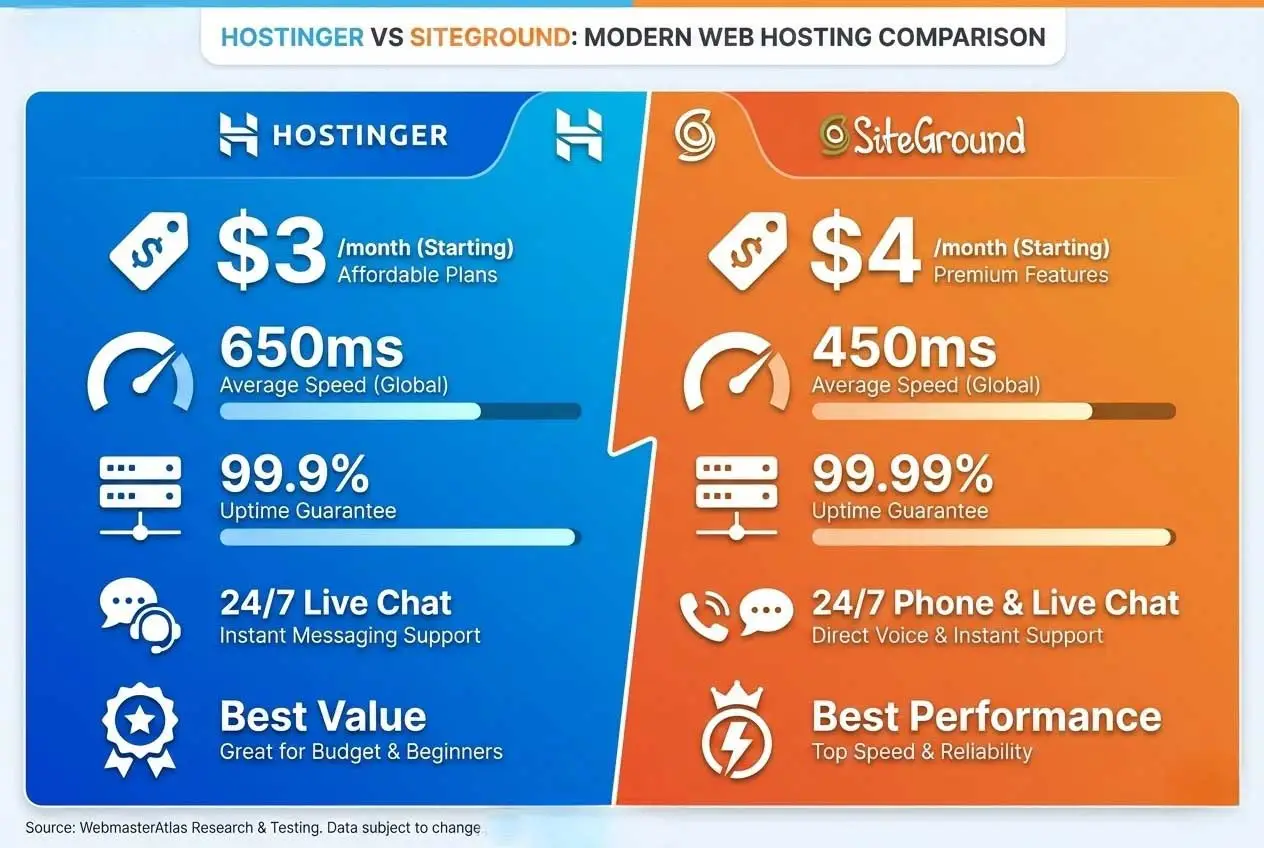
Starting Price | ~$3/month | ~$4/month | Hostinger |
Free Domain | First year | No | Hostinger |
Uptime | 99.9%+ | 99.99%+ | SiteGround |
Support Channels | Live chat, tickets | Phone, chat, tickets | SiteGround |
WordPress Staging | Higher plans | All plans | SiteGround |
Daily Backups | Manual/paid | Automatic free | SiteGround |
Money-Back Guarantee | 30 days | 30 days | Tie |
Best For | Budget users | Business sites | Depends |
Hostinger Overview
Hostinger positions itself as an affordable hosting provider without sacrificing essential features. Founded in 2004, the company has grown to serve millions of websites worldwide with a focus on making web hosting accessible to everyone.
Key Features
Hosting Technology: Hostinger uses LiteSpeed servers, which are faster than traditional Apache servers. Their infrastructure includes SSD storage across all plans and built-in caching to speed up WordPress sites. You'll also get free Cloudflare integration for content delivery.
WordPress Optimization: The platform includes a custom WordPress management panel that simplifies site administration. Their WordPress Accelerator plugin helps improve load times, though it's not as sophisticated as some premium alternatives. One-click WordPress installation makes getting started straightforward.
Security Measures: Free SSL certificates come standard, protecting data between your site and visitors. Cloudflare-protected nameservers add an extra security layer. BitNinja security software monitors for threats, though some advanced security features require higher-tier plans.
Control Panel: Hostinger developed hPanel, a custom control panel designed to be more user-friendly than cPanel. While it takes some adjustment if you're used to cPanel, most users find it intuitive once they familiarize themselves with the layout.
Pricing Structure
Hostinger's pricing appears attractive at first glance, but understanding the structure helps set proper expectations.
Entry Plans: The single website plan starts around $3 monthly when you commit to a longer term. This includes 50GB storage and 100GB bandwidth, which works for smaller sites but may feel restrictive as you grow.
Mid-Tier Options: Premium plans offer unlimited websites and bandwidth for slightly more, typically around the same promotional rate. These plans add more storage and resources, making them better value for most users.
Important Notes: Promotional pricing requires multi-year commitments. Renewal rates increase significantly - often 3-4x the introductory rate. Monthly billing options cost considerably more than long-term commitments. The free domain is only included for the first year. Check current Hostinger pricing.
Hostinger Pros
Affordable entry point - Among the cheapest reputable hosting providers, making it accessible for beginners testing the waters.
Free domain first year - Saves $15-20 and simplifies the setup process for new website owners.
User-friendly interface - hPanel may lack some advanced features, but its simplicity helps newcomers avoid feeling overwhelmed.
Decent performance - LiteSpeed servers and SSD storage deliver respectable load times for the price point.
Multiple data centers - Choose server locations closer to your target audience for better performance.
99.9% uptime guarantee - Reliable enough for most small business and personal websites.
Free website migration - Professional migration service helps you move from another host without technical hassles.
Hostinger Cons
Support limited to chat - No phone support can frustrate users who prefer speaking directly with support staff.
Renewal price increases - The jump from promotional to standard pricing catches many users off guard.
Manual backups on lower plans - You'll need to remember to create backups yourself or pay extra for automated backups.
Resource limits on cheap plans - Entry-level plans may struggle with traffic spikes or resource-intensive plugins.
Upsells during checkout - The purchasing process includes numerous add-on offers that can feel pushy.
SiteGround Overview
SiteGround targets users who prioritize performance and support over bargain pricing. The company has built its reputation on WordPress-optimized hosting with responsive customer service and reliable infrastructure.
Key Features
Google Cloud Infrastructure: SiteGround runs on Google Cloud Platform, providing enterprise-level infrastructure. This translates to better reliability and performance compared to shared hosting on traditional servers. Their network spans multiple continents with data centers in North America, Europe, Asia, and Australia.
Advanced Caching: The proprietary SuperCacher system includes static caching, dynamic caching, and Memcached. This multi-layer approach significantly speeds up WordPress sites without requiring technical configuration. Their custom SG Optimizer plugin integrates seamlessly with this caching system.
Security Features: Daily automated backups give you 30 days of restore points at no extra cost. Their AI-powered anti-hack system monitors for suspicious activity. Free SSL certificates, isolated site accounts, and custom firewall rules add multiple security layers.
Developer-Friendly Tools: Git integration, WP-CLI access, and staging environments on all plans appeal to developers. SSH access and the ability to run custom cron jobs provide flexibility for advanced users.
Pricing Structure
SiteGround costs more than budget hosts but includes features others charge extra for.
StartUp Plan: Around $4 monthly with annual commitment for one website. Includes 10GB storage and monthly visit limits, suitable for smaller sites but restrictive for growing businesses.
GrowBig Plan: Mid-tier option at roughly $6-7 monthly includes unlimited websites, on-demand backups, and staging environments. Most users find this tier offers the best value.
GoGeek Plan: Premium plan at $10-12 monthly adds priority support, advanced performance features, and higher resource limits for demanding sites.
Renewal Considerations: Like most hosts, renewal rates are significantly higher than promotional prices - typically 3-4x the introductory rate. No free domain included on any plan. Monthly billing available but costs considerably more than annual commitment. View SiteGround pricing.
SiteGround Pros
Exceptional support - Phone and live chat staffed by WordPress experts who solve problems quickly and thoroughly.
Superior performance - Google Cloud infrastructure and advanced caching consistently deliver fast load times.
Automatic daily backups - 30-day backup retention with free restoration removes worry about data loss.
WordPress staging on all plans - Test changes safely before pushing to production, a feature many competitors restrict to premium plans.
Proactive security monitoring - AI-powered systems catch and block threats before they affect your site.
Official WordPress recommendation - WordPress.org lists SiteGround as a recommended hosting provider.
Free website migration - Expert migration team handles the transfer process professionally.
Better resource allocation - Fewer sites per server means your site gets more CPU and memory.
SiteGround Cons
Higher pricing - Costs more upfront than budget alternatives like Hostinger.
No free domain - You'll need to purchase your domain separately, adding to first-year costs.
Limited storage - 10-40GB SSD storage is adequate for most sites but restrictive compared to competitors offering 100GB+.
Renewal price shock - The jump from promotional to renewal pricing is substantial.
Visit limits on entry plan - StartUp plan's monthly visit cap may require upgrading sooner than expected.
Detailed Feature Comparison
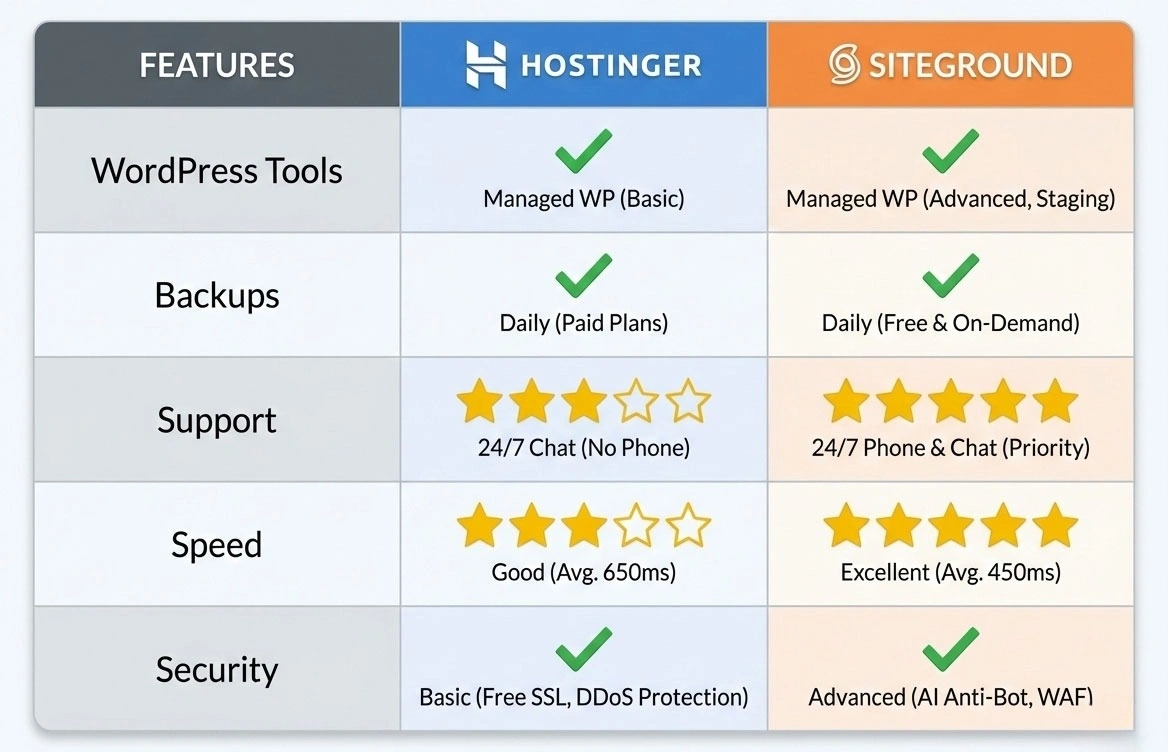
Performance and Speed
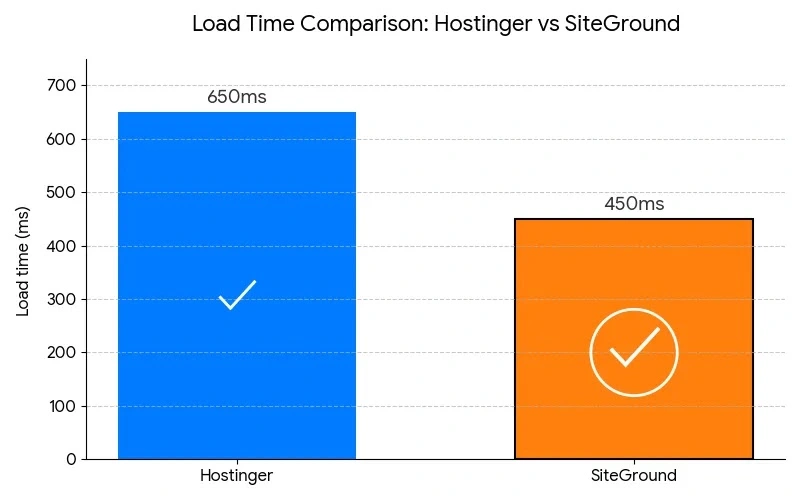
Website speed affects user experience, search rankings, and conversion rates. Both hosts deliver acceptable performance, but with different approaches.
Hostinger Performance: LiteSpeed servers provide solid baseline speed. Their WordPress Accelerator plugin includes basic caching. Cloudflare CDN integration helps with global content delivery. Load times are generally good for the price point, though sites may slow during traffic spikes on lower-tier plans.
SiteGround Performance: Google Cloud Platform infrastructure offers better baseline speed. SuperCacher's multi-layer approach delivers consistently faster load times. CDN via Cloudflare Enterprise provides better global performance. Resource allocation ensures your site maintains speed during traffic increases.
Winner: SiteGround - The performance gap is noticeable, especially for WordPress sites with plugins and dynamic content.
Uptime and Reliability
Uptime determines whether visitors can access your site consistently.
Hostinger Uptime: 99.9% uptime guarantee allows approximately 8 hours of downtime yearly. Independent monitoring generally shows they meet this target. Occasional brief outages occur but are typically resolved quickly.
SiteGround Uptime: 99.99% uptime commitment reduces allowed downtime to under an hour yearly. Proactive monitoring catches issues before they cause extended outages. Google Cloud infrastructure provides better redundancy.
Winner: SiteGround - That extra 9 matters for business-critical websites where every minute of downtime costs money.
Customer Support Quality
Support quality becomes crucial when you encounter problems.
Hostinger Support: 24/7 live chat responds within 2-3 minutes typically. Support staff are friendly and handle common issues effectively. More complex WordPress or server problems sometimes require escalation. Extensive knowledge base covers common questions. No phone support limits options for users who prefer voice communication.
SiteGround Support: 24/7 phone support provides immediate voice assistance. Live chat responses average under 90 seconds. Support staff include WordPress specialists who solve technical problems efficiently. Proactive monitoring means they often detect and fix issues before you notice. Priority support on higher-tier plans gets even faster responses.
Winner: SiteGround - Phone support, faster responses, and deeper WordPress expertise make a significant difference.
WordPress-Specific Features
Both hosts market themselves as WordPress-friendly, but implementation differs.
Hostinger WordPress Features:
One-click WordPress installer
WordPress Accelerator plugin for basic caching
Auto-updates available but not forced
Staging environments on Business plan and higher
Object caching on premium plans
SiteGround WordPress Features:
One-click installer with pre-installed security
SG Optimizer plugin with advanced caching
Automatic WordPress core updates
Staging on all plans, including StartUp
Git integration for version control
WP-CLI access for command-line management
Winner: SiteGround - More sophisticated WordPress tools and staging on all plans provide better value for WordPress hosting users.
Backup and Security
Data protection prevents disaster when things go wrong.
Hostinger Backup: Weekly manual backups on lower plans. Automatic daily backups available on higher tiers or as paid add-on. 7-day backup retention. Manual backup restoration process. BitNinja security monitoring included.
SiteGround Backup: Automatic daily backups on all plans. 30-day backup retention. On-demand backup creation anytime. Free backup restoration with one click. AI-powered anti-hack system. Custom firewall rules. Isolated site accounts prevent cross-site contamination.
Winner: SiteGround - Automatic daily backups with longer retention and easier restoration provide crucial peace of mind.
Scalability and Resources
How well can your hosting grow with your website?
Hostinger Scalability: Easy plan upgrades within shared hosting. Cloud hosting available for sites outgrowing shared plans. Resource limits clearly defined but may feel restrictive on entry plans. Upgrade process is straightforward through hPanel.
SiteGround Scalability: Plan upgrades within shared hosting accommodate most growth. Cloud hosting options for sites needing dedicated resources. Better resource allocation on shared plans means you can grow further before upgrading. Fewer sites per server reduces resource competition.
Winner: SiteGround - Better resource allocation delays the need to upgrade, saving money long-term.
Pricing Value Analysis
Understanding true value requires looking beyond promotional rates.
First Year Costs
Hostinger:
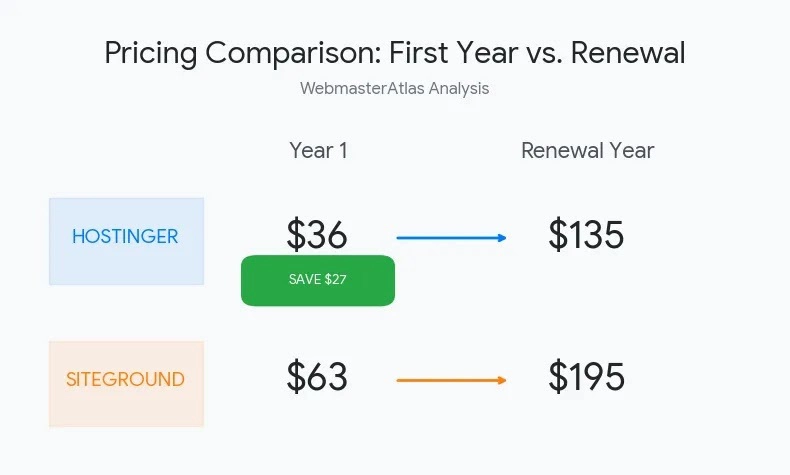
Hosting: ~$36 annually (promotional rate)
Domain: Free first year
Total first year: ~$36
SiteGround:
Hosting: ~$48 annually (promotional rate)
Domain: ~$15
Total first year: ~$63
Hostinger saves approximately $27 in year one.
Renewal Year Costs
Hostinger:
Hosting: ~$120 annually (renewal rate)
Domain: ~$15
Total renewal: ~$135
SiteGround:
Hosting: ~$180 annually (renewal rate)
Domain: ~$15
Total renewal: ~$195
SiteGround costs ~$60 more annually after promotional pricing ends.
Value Considerations
Hostinger offers clear cost savings, but consider what you're getting:
With Hostinger's savings, you're getting adequate hosting for simple sites. With SiteGround's premium, you're getting daily backups (worth $3-5/month elsewhere), staging environments (worth $5-10/month), superior support, and better performance.
For a hobby blog or personal portfolio, Hostinger's savings make sense. For a business website where downtime costs money or an e-commerce site where speed affects sales, SiteGround's premium features justify the cost. Compare more options in our complete web hosting category.
Which Hosting Should You Choose?
Choose Hostinger If:
You're budget-conscious - The savings over several years add up, especially if hosting multiple sites on one plan.
You're starting your first website - Lower commitment makes experimentation less risky financially.
You run a small blog or portfolio - Basic features suffice for sites without heavy traffic or e-commerce.
You're comfortable with basic support - Chat support works fine if you can troubleshoot common issues or wait for responses.
You need multiple sites cheaply - Unlimited websites on premium plans offer good value for managing several small projects.
Storage matters more than speed - Higher storage allocations suit sites with lots of media or files.
Choose SiteGround If:
You run a business website - Better uptime and performance directly affect your revenue and reputation.
You need reliable support - Phone support and WordPress experts solve problems faster when time matters.
You value automated backups - Daily backups with 30-day retention prevent data loss disasters.
Speed affects your conversions - E-commerce sites and service businesses benefit from consistently fast loading.
You're serious about WordPress - Advanced WordPress features, staging, and optimization justify the premium.
You want room to grow - Better resource allocation means you'll upgrade less frequently.
You prefer managed hosting - Automatic updates, security monitoring, and optimization happen without your involvement.
Migration Considerations
Switching hosts involves several steps regardless of which direction you're moving.
Moving to Hostinger
Hostinger provides free migration service on all plans. Their team handles the technical transfer, typically completing it within 24-48 hours. You'll need to provide access credentials for your current hosting account. Downtime is usually minimal, though DNS propagation may take several hours.
Alternatively, use WordPress migration plugins like All-in-One WP Migration or Duplicator for DIY transfers. These work well for smaller sites under hosting file limits.
Moving to SiteGround
SiteGround offers free professional migration on all plans. Their experienced migration team handles WordPress transfers efficiently. One migration is free on the StartUp plan; GrowBig and GoGeek include unlimited migrations. The process typically takes 24-48 hours with minimal downtime.
Their migration team has extensive WordPress experience, making complex site transfers smoother than DIY attempts. If you're considering other hosting providers, most also offer migration services.
Frequently Asked Questions
Which is faster, Hostinger or SiteGround?
SiteGround typically delivers faster load times due to Google Cloud infrastructure and advanced SuperCacher technology. Hostinger provides decent speed with LiteSpeed servers but doesn't match SiteGround's consistent performance. For sites where every millisecond counts - like e-commerce or business sites - SiteGround's speed advantage matters. For blogs and portfolios where slight speed differences are less critical, Hostinger performs adequately.
Does Hostinger include a free domain like SiteGround?
Hostinger includes a free domain for the first year on all hosting plans, while SiteGround doesn't include free domains on any plan. This saves approximately $15-20 in your first year with Hostinger. However, domain renewal costs are similar at both hosts after the first year, so this benefit only applies initially.
Which has better customer support?
SiteGround offers superior support with 24/7 phone and live chat staffed by WordPress experts. Average response times are faster, and support staff can handle more complex technical issues. Hostinger provides 24/7 live chat support that handles common problems effectively but lacks phone support and may need to escalate more complex WordPress issues. For beginners who value quick access to knowledgeable help, SiteGround's support advantage is significant.
Can I host multiple websites on both platforms?
Hostinger's Premium and Business plans allow unlimited websites, making it cost-effective for managing multiple sites. SiteGround's StartUp plan allows only one website, while GrowBig and GoGeek plans support unlimited websites. If you need to host multiple sites, compare the cost of Hostinger's Premium plan against SiteGround's GrowBig plan, considering the feature differences beyond just website quantity.
What happens when promotional pricing ends?
Both hosts significantly increase prices at renewal - typically 3-4x the promotional rate. Hostinger's entry plan jumps from around $3 to $10 monthly, while SiteGround's StartUp plan increases from around $4 to $18 monthly. Lock in promotional rates for longer terms (2-3 years) to delay renewal increases. Budget for higher costs after the promotional period ends, or be prepared to shop for new hosting when renewal time comes.
Which is better for WordPress?
SiteGround is generally better for WordPress with automatic daily backups, staging environments on all plans, advanced caching, and official WordPress.org recommendation. Their support staff includes WordPress specialists who solve WordPress-specific problems efficiently. Hostinger works fine for WordPress and costs less, but lacks some advanced features and has more basic WordPress optimization. Choose SiteGround if WordPress performance and management tools matter; choose Hostinger if budget is the priority and basic WordPress functionality suffices.
Are there any hidden fees?
Both hosts are transparent about renewal pricing, though the increases are substantial. Additional costs to consider: domain renewals after the first year ($15-20), SSL certificates if you need premium options (basic SSL is free on both), premium backups on Hostinger's lower plans, and potential upgrade costs if you exceed resource limits. SiteGround doesn't include a free domain, adding $15 to your first-year costs. Read the renewal rates carefully before committing, and factor these into your long-term hosting budget.
Final Verdict
Hostinger and SiteGround both deliver reliable hosting but serve different priorities.
Hostinger wins on affordability. If you're launching your first website, running a hobby blog, or managing personal projects, the cost savings make sense. You'll get solid performance and essential features at budget-friendly prices. The free domain, generous storage, and unlimited websites on mid-tier plans provide good value for price-conscious users.
SiteGround wins on performance and features. For business websites, e-commerce stores, or any project where downtime costs money, the premium is worth it. Superior speed, exceptional support, automatic daily backups, and advanced WordPress tools justify higher costs. The peace of mind from 99.99% uptime and responsive phone support adds value beyond the technical specifications.
Consider your specific situation: A blogger just starting out benefits more from Hostinger's savings. A business owner whose website generates revenue benefits from SiteGround's reliability and speed. An e-commerce store owner needs SiteGround's better uptime and performance. A developer managing client sites appreciates SiteGround's staging and Git integration.
Both hosts offer 30-day money-back guarantees, allowing you to test their service risk-free. Choose based on whether you prioritize saving money now or investing in better performance and support for the long term. Get started with Hostinger or SiteGround today.
Ready to choose? Explore detailed reviews and current pricing for Hostinger and SiteGround on WebmasterAtlas, or compare all options in our web hosting category to find the perfect fit for your website needs.