Affiliate Disclosure: Some links on this page are affiliate links. When you click on these links and make a purchase, we may receive a commission at no additional cost to you. This helps support our platform. Our recommendations are based on quality and value, not commission rates. Learn more
Notion
FeaturedVerifiedAll-in-one workspace with docs, wikis, projects, databases, and AI agents. Trusted by 100M+ users and 62% of Fortune 100.
Notion
This resource is developed by Notion
About Notion
What is Notion?
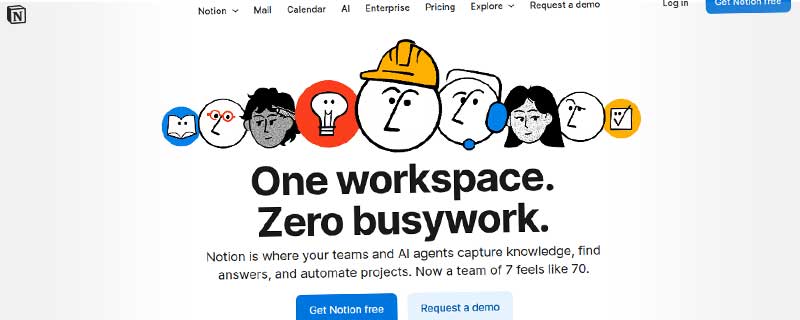
Notion is an all-in-one workspace that combines wikis, documents, databases, projects, and AI capabilities into a single platform. Trusted by over 100 million users worldwide and 62% of Fortune 100 companies, Notion serves as a unified hub for knowledge management, project collaboration, and team productivity. With the introduction of Notion 3.0, the platform now features AI agents that automate repetitive tasks, making teams of 7 feel like 70.
Unlike traditional productivity tools that solve single problems, Notion replaces multiple separate applications—wikis, project management tools, databases, note-taking apps, and documentation platforms—with one flexible workspace. The platform's block-based architecture allows teams to structure information exactly how they need it, from simple notes to complex project management systems with multiple views and automated workflows.
Core Workspace Capabilities
Notion's workspace is built around flexible, interconnected pages that can contain any type of content. Every page can be transformed into a wiki, document, database, or project board using Notion's powerful block system. Teams can create nested page hierarchies, link related content, and organize information using tags, folders, and databases.
The platform's database functionality stands out as particularly powerful. Unlike spreadsheets, Notion databases can display the same information in multiple views—table, board, calendar, gallery, timeline, and list—allowing different team members to work with data in their preferred format. Each database can have properties with different data types, formulas, and relations to other databases, enabling complex information architecture.
- Documents & Pages - Rich text editing with formatting, embeds, and nested page structures
- Wikis & Knowledge Bases - Create interconnected documentation with page linking and backlinks
- Databases - Flexible databases with properties, relations, rollups, and formula fields
- Project Boards - Kanban boards, timelines, and calendar views for project management
- Templates - Over 10,000 pre-built templates for every use case, plus custom templates
Notion 3.0: AI Agents and Automation
With Notion 3.0, the platform introduces AI agents that work alongside your team to automate busywork. These agents understand your workspace context and can complete complex multi-step tasks that previously required manual effort. Tell your Notion Agent what you need, and it handles everything from research to document creation to data analysis.
Notion's AI capabilities go beyond simple text generation. The AI Agent can search across all your pages, connected apps, Slack messages, and the web to surface exactly what you need. It learns how your team works and can be personalized with custom instructions, behaviors, and even appearance. The AI features are deeply integrated into the workspace, appearing contextually where you need them most.
- AI Writing Assistant - Draft content, improve writing, translate, and adjust tone instantly
- AI Summarization - Summarize long documents, meeting notes, and research into key points
- AI Automation - Automate workflows, data entry, and repetitive tasks with custom agents
- Enterprise Search - AI-powered search across Notion, Slack, Drive, and connected apps
- AI Meeting Notes - Automatically transcribe and structure meeting recordings
Collaboration and Team Features
Notion enables real-time collaboration where multiple team members can edit the same page simultaneously, with changes appearing instantly. The platform includes robust permission controls, allowing you to set page-level or database-level access for individuals, teams, or guests. Comments and mentions facilitate async communication, letting teams discuss work in context without switching to email or chat.
Team workspaces can be organized by departments, projects, or any structure that fits your organization. Guest access allows external collaborators, clients, or contractors to access specific pages without a full account. Version history tracks all changes with the ability to restore previous versions, and page analytics show who's viewing and editing content.
Multiple Views and Flexible Layouts
One of Notion's most powerful features is the ability to view the same data in multiple formats. A project database can be viewed as a table for detailed planning, a board for sprint management, a timeline for roadmap visualization, a calendar for scheduling, and a gallery for visual reference—all from the same underlying data. This flexibility ensures every team member can work in the view that suits their needs.
Pages can also be synced across multiple locations, meaning the same content block can appear in different pages and update everywhere simultaneously. This is particularly useful for roadmaps, team directories, and status dashboards that need to be referenced in multiple contexts.
Integrations and Connected Workspace
Notion connects with over 100 third-party applications, allowing you to embed content and sync data from external sources. The platform integrates deeply with tools like Slack, Google Drive, GitHub, Figma, and Jira, bringing information from your entire tech stack into one place. The Notion API enables custom integrations and workflows for advanced use cases.
The Web Clipper browser extension lets you save articles, web pages, and research directly into your Notion workspace with one click. Content is automatically formatted and can be tagged and organized upon import. Notion also supports embeds from hundreds of services, letting you display live content from YouTube, Google Maps, Typeform, and more directly in your pages.
Platform Availability
Notion is available across all major platforms with feature parity, ensuring you can work seamlessly wherever you are:
- Web App - Full-featured browser access requiring no installation
- Desktop Apps - Native applications for Windows, Mac, and Linux
- Mobile Apps - Full-featured iOS and Android apps with offline support
- Web Clipper - Browser extension for Chrome, Firefox, Safari, and Edge
- Notion Calendar - Standalone calendar app that integrates with Google Calendar
- Notion Mail - AI-powered email client (currently in beta) that thinks like you
All platforms support offline mode, allowing you to work without internet and automatically syncing changes when you reconnect. The mobile apps are particularly well-designed, offering the same flexibility as the desktop version with touch-optimized interfaces.
Pricing and Plans
Notion offers a generous freemium model that makes it accessible to individuals and small teams, with scalable paid plans for growing organizations:
- Free Plan - Unlimited pages and blocks for individuals, 10 guests, 7-day version history, basic integrations
- Plus Plan ($10/user/month) - Unlimited guests, 30-day version history, unlimited file uploads, bulk exports
- Business Plan ($18/user/month) - Advanced permissions, SAML SSO, audit log, priority support, advanced AI features
- Enterprise Plan (Custom pricing) - Advanced security, dedicated success manager, custom contracts, advanced admin tools, workspace analytics
- AI Add-on ($10/user/month) - Unlimited AI responses, auto-fill databases, custom AI agents (included in Business+)
Education teams receive special pricing, and non-profit organizations can apply for discounts. The free plan is genuinely useful for personal use and small teams, making Notion one of the most accessible all-in-one workspaces available.
Use Cases and Applications
Notion's flexibility makes it suitable for virtually any workflow. Common use cases include:
- Product Management - Product roadmaps, feature specs, user research, and sprint planning
- Engineering - Technical documentation, API references, runbooks, and incident logs
- Design - Design systems, component libraries, user research, and design specs
- Marketing - Content calendars, campaign planning, brand guidelines, and asset libraries
- Operations - Company wikis, SOPs, onboarding guides, and team directories
- Sales - CRM databases, deal tracking, client notes, and sales playbooks
- HR - Employee directories, recruitment pipelines, policy documentation, and benefits guides
- Personal - Task management, journaling, habit tracking, and knowledge management
Security and Compliance
Notion takes security seriously with enterprise-grade protections. All data is encrypted in transit and at rest using AES-256 and TLS 1.2+. The platform is SOC 2 Type 2 certified and GDPR compliant, with data processing agreements available for enterprise customers.
Business and Enterprise plans include advanced security features like SAML single sign-on, SCIM provisioning, and audit logs. Administrators have granular controls over workspace settings, member permissions, and guest access. Notion also offers data residency options for EU customers and maintains 99.9% uptime SLA for Enterprise customers.
Learning Resources and Community
Notion provides extensive resources for learning and getting help. The platform features comprehensive documentation, video tutorials, and a template gallery with thousands of ready-to-use examples. The Notion Community has over 1.4 million members sharing tips, templates, and best practices.
Customer support varies by plan, with email support for all plans, priority email for Business, and dedicated success managers for Enterprise. The platform also has an active presence on social media where the team regularly shares tips and responds to user questions.
Comparison with Alternatives
Notion competes with various specialized tools but distinguishes itself through its all-in-one approach. Compared to Confluence, Notion offers better UX and more flexibility but may lack some enterprise Wiki features. Versus Asana or Monday.com, Notion provides more content creation capabilities but less sophisticated resource management. Against Coda, Notion has a gentler learning curve and better mobile apps but fewer automation formulas.
The platform's true strength is eliminating tool sprawl. Companies report saving $340 per user monthly by replacing multiple tools—project management ($24/user), team wiki ($10/user), AI chatbot ($20/user), CRM, site builder, forms, and others—with a single Notion subscription. This consolidation not only saves money but reduces context switching and integration complexity.
Recent Updates and Roadmap
Notion 3.0, released in 2024, represents the platform's biggest update yet with AI agents at its core. The update includes Enterprise Search that searches across all connected apps, AI Meeting Notes that automatically structure recordings, and Custom Agents that you can train for specific workflows. The company continues to invest heavily in AI capabilities, automation, and enterprise features.
Notion Calendar launched as a standalone app with deep Notion integration, allowing you to schedule tasks alongside meetings. Notion Mail is currently in beta, promising an AI-powered inbox that thinks like you. The company actively solicits feedback through its community and regularly ships updates based on user requests.
ℹ️ Information Accuracy Notice
While we strive to keep all information about this resource accurate and up-to-date, details such as pricing, features, and availability may change. We encourage you to always verify the information directly on the official website before making any decisions or purchases. Our goal is to help you discover great tools, not to misrepresent any products or services.
Notion Features
Detailed specifications and capabilities of this resource.
Wikis & Knowledge Base
Task Management
Project Management
Database & Tables
Calendar Integration
Real-time Collaboration
Comments & Mentions
Team Workspaces
Guest Access
Permissions & Roles
Version History
Templates
Template Gallery
Rich Media Support
Code Blocks
Markdown Support
Multiple Views
Nested Pages
Search
Documents & Pages
Expert Rating
Expert rating based on features, performance, and value
Pros & Cons
Pros
Cons
Do you recommend Notion?
Resource Information
- Category
- Team Collaboration
- Brand
- Notion
- Pricing
- FREEMIUM
- Last Updated
- 2026-01-13Recently