Affiliate Disclosure: Some links on this page are affiliate links. When you click on these links and make a purchase, we may receive a commission at no additional cost to you. This helps support our platform. Our recommendations are based on quality and value, not commission rates. Learn more
Trello
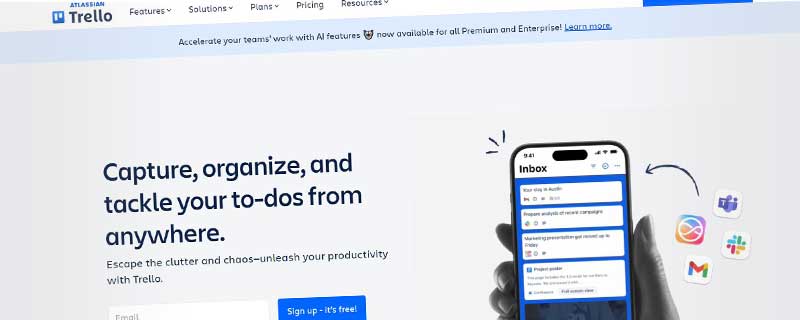
VerifiedVisual collaboration platform organizing projects into boards, lists, and cards with Kanban-style workflow management for teams of all sizes.
Trello
This resource is developed by Trello
About Trello
Trello is a visual collaboration platform that organizes projects into boards, lists, and cards, providing teams with an intuitive way to manage workflows and track progress. Launched in 2011 and acquired by Atlassian in 2017, Trello has grown to serve over 50 million users worldwide, from freelancers and small teams to large enterprises managing complex projects.
Built around the Kanban methodology, Trello makes project management accessible through its visual board interface. Each board represents a project, lists represent stages of work, and cards contain individual tasks with details, attachments, and comments. This simple yet powerful structure adapts to virtually any workflow, making Trello one of the most versatile collaboration tools available today.
Core Features & Capabilities
Trello's strength lies in its flexibility and ease of use. Teams can start working immediately without extensive training, yet the platform scales to accommodate sophisticated project management needs through its Power-Ups and automation features.
Board organization includes:
- Unlimited Boards: Create separate boards for different projects, teams, or workflows with no restrictions on paid plans
- Customizable Lists: Organize work stages like "To Do," "In Progress," and "Done," or adapt to your unique process
- Visual Cards: Drag-and-drop cards between lists to track progress, with support for rich descriptions, checklists, and due dates
- Card Templates: Save time by creating reusable card templates for recurring tasks or standardized workflows
- Board Templates: Choose from hundreds of pre-built templates or create your own for different project types
Collaboration happens naturally within Trello. Team members can be assigned to cards, mentioned in comments, and receive real-time notifications about updates. The activity feed on each card provides complete visibility into who did what and when, creating accountability and transparency.
Power-Ups & Integrations
Trello's Power-Ups system transforms the platform from a simple task board into a comprehensive project management hub. These integrations add specialized functionality without cluttering the core interface, allowing teams to customize their workspace precisely to their needs.
Popular Power-Ups include:
- Calendar View: Visualize due dates across cards in a traditional calendar format for better deadline management
- Custom Fields: Add structured data like numbers, dates, dropdowns, or checkboxes to cards for enhanced organization
- Butler Automation: Create no-code automations with rules, buttons, and scheduled commands to eliminate repetitive work
- Slack Integration: Receive Trello notifications in Slack channels and create cards directly from messages
- Google Drive: Attach files from Google Drive and preview documents directly within cards
- Jira Integration: Connect development workflows by linking Trello cards to Jira issues for cross-team visibility
Free plans include one Power-Up per board, while paid plans offer unlimited Power-Ups. The extensive Power-Up directory features over 200 integrations covering time tracking, reporting, CRM, development tools, and more.
Butler Automation
Built directly into Trello, Butler provides powerful automation without requiring coding knowledge. Teams can create sophisticated workflows that respond to actions, apply rules based on conditions, schedule recurring tasks, and add custom buttons for one-click actions.
Automation examples include automatically moving cards when checklists are completed, assigning team members based on labels, creating follow-up cards when tasks finish, sending scheduled reminders for upcoming deadlines, and archiving completed cards after a set period. Butler's monthly automation limit ranges from 250 commands on the free plan to unlimited on Enterprise.
Views & Visualizations
Beyond the classic board view, Trello Premium and higher tiers unlock additional perspectives on your work. The Timeline view displays cards on a Gantt chart for understanding project schedules and dependencies. Table view presents cards in a spreadsheet format, perfect for sorting and bulk editing. Calendar view shows all cards with due dates in a monthly calendar, helping teams manage deadlines across projects. Dashboard view aggregates data across multiple boards, providing high-level insights for managers and stakeholders.
Mobile & Desktop Experience
Trello offers native applications for every platform, ensuring team members stay connected regardless of their device. iOS and Android apps provide full functionality including offline access, push notifications, and quick card creation through widgets. Desktop applications for Windows and Mac offer enhanced performance and native integrations. The web application works flawlessly in all modern browsers with responsive design that adapts to different screen sizes.
Security & Compliance
Trello takes security seriously with enterprise-grade protections. All data transmits via encrypted HTTPS connections, and sensitive information receives encryption at rest. Two-factor authentication adds an extra security layer for user accounts. Enterprise plans include Single Sign-On (SSO) with SAML support, allowing organizations to enforce their authentication policies.
Compliance certifications include SOC 2 Type II attestation, demonstrating Trello's commitment to security controls. The platform complies with GDPR requirements for European data protection and offers data residency options for Enterprise customers. Detailed audit logs track user actions for compliance and accountability needs.
Pricing Plans
Trello offers four pricing tiers designed to accommodate everyone from individual users to large enterprises. The generous free plan makes Trello accessible for small teams and personal projects, while paid plans unlock advanced features for professional use.
Free Plan: $0
- Unlimited cards and up to 10 boards per workspace
- Unlimited Power-Ups (1 per board)
- 10 MB per file attachment limit
- Basic Butler automation with 250 commands per month
- Mobile apps with offline access
The free plan works well for individuals, freelancers, and small teams just getting started with project management. While limited, it provides core Trello functionality without cost.
Standard Plan: $5/user/month (billed annually)
- Unlimited boards per workspace
- Advanced checklists with dependencies
- Custom fields Power-Up included
- 250 MB per file attachment
- 1,000 Butler automation commands per month
- Saved searches for quick filtering
Standard provides excellent value for growing teams needing more storage and automation capacity while maintaining affordability.
Premium Plan: $10/user/month (billed annually)
- All Standard features included
- Timeline, Table, Calendar, and Dashboard views
- Collections for organizing multiple boards
- Workspace templates and board templates
- Simple data export for boards
- Unlimited Butler automation commands
- Admin and security features
- Priority customer support
Premium suits professional teams requiring advanced views, unlimited automation, and enhanced administrative controls for managing complex workflows.
Enterprise Plan: $17.50/user/month (billed annually)
- All Premium features included
- Organization-wide permissions and controls
- Free guests and multi-board guests
- Attachment permissions and restrictions
- SSO with SAML, Google Apps, and other providers
- Annual user limit adjustment flexibility
- Dedicated Customer Success Manager
- 99.99% uptime SLA guarantee
Enterprise delivers the security, compliance, and support features large organizations require, along with volume pricing and dedicated account management.
Use Cases & Industry Applications
Trello's flexibility makes it valuable across virtually every industry and team type. Software development teams use Trello for sprint planning, bug tracking, and feature prioritization. Marketing departments manage content calendars, campaign launches, and creative workflows. Sales teams track leads through pipelines and manage customer relationships. HR departments coordinate recruiting processes, onboarding checklists, and employee development programs.
Beyond business applications, individuals use Trello for personal productivity, home renovation projects, event planning, and content creation. Teachers organize lesson plans and student assignments, while non-profits coordinate volunteers and fundraising campaigns. The visual nature of Trello makes it particularly effective for creative projects where seeing the big picture matters.
Who Should Use Trello?
Trello excels as a collaboration tool for teams prioritizing simplicity and visual organization over complex features. It's particularly well-suited for groups that value flexibility and want a tool that adapts to their processes rather than forcing them into rigid workflows.
Ideal for:
- Small to Medium Teams: Groups of 2-50 people who need straightforward project tracking without enterprise complexity
- Visual Thinkers: Teams that prefer seeing work laid out spatially rather than in lists or spreadsheets
- Agile Teams: Development groups practicing Scrum or Kanban methodologies that align naturally with Trello's structure
- Cross-Functional Collaboration: Diverse teams where non-technical members need easy-to-understand project visibility
- Freelancers & Consultants: Independent workers managing multiple client projects simultaneously with simple organization
- Remote Teams: Distributed workers needing asynchronous communication and transparent progress tracking
However, Trello may not be the best fit for teams requiring advanced resource management, built-in time tracking, complex project dependencies, or Gantt chart planning as primary features. Organizations needing comprehensive reporting and analytics might find Trello's native capabilities limited, though integrations can fill these gaps.
ℹ️ Information Accuracy Notice
While we strive to keep all information about this resource accurate and up-to-date, details such as pricing, features, and availability may change. We encourage you to always verify the information directly on the official website before making any decisions or purchases. Our goal is to help you discover great tools, not to misrepresent any products or services.
Trello Features
Detailed specifications and capabilities of this resource.
Wikis & Knowledge Base
Task Management
Project Management
Database & Tables
Calendar Integration
Real-time Collaboration
Comments & Mentions
Team Workspaces
Guest Access
Permissions & Roles
Version History
Templates
Template Gallery
Rich Media Support
Code Blocks
Markdown Support
Multiple Views
Nested Pages
Search
Documents & Pages
Expert Rating
Expert rating based on features, performance, and value
Pros & Cons
Pros
Cons
Do you recommend Trello?
Related Resources
Resource Information
- Category
- Team Collaboration
- Brand
- Trello
- Pricing
- FREEMIUM
- Last Updated
- 2026-01-13Recently